|
 
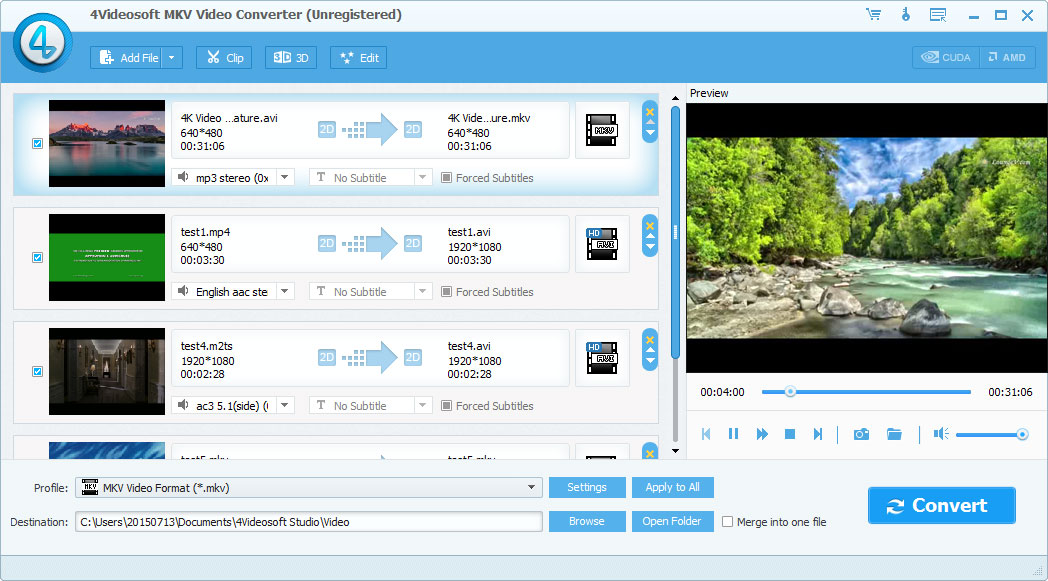
 4Videosoft MKV Video Converter is the best Video Converter to convert MKV to other popular video formats such as MP4, MOV, AVI, FLV, M4V, MPEG, etc. It gives you the best editing functions to optimize your output videos as you like. 4Videosoft MKV Video Converter is the best Video Converter to convert MKV to other popular video formats such as MP4, MOV, AVI, FLV, M4V, MPEG, etc. It gives you the best editing functions to optimize your output videos as you like.
Key features:
1. Convert MKV video to the videos you like
The MKV Video Converter is able to convert MKV videos as you like. You can convert your MKV video to other video formats. It highly supports almost all popular video formats like MP4, MOV, M4V, AVI, FLV, etc. You can enjoy these output videos on your portable devices such as iPhone 5S/5C, iPhone 5, iPhone 4S, iPad Air, iPod touch, Samsung Note 3, Samsung Galaxy S5, HTC one, Nokia lumia, BlackBerry and Sony Xperia and so on. In addition, you can extract your audio files from the source video and convert them to the audio formats you like.
2. Optimize your output videos
4Videosoft MKV Video Converter provides you with splendid editing functions like trim, crop, effect, watermark and merge to edit your videos as you like. You can modify your video effect by adjusting Brightness, Contrast, Saturation, Hue and Volume. It enables you to reset video length and screen size as well as add text and image watermark.
3. Other fantastic functions
With this powerful MKV Video Converter, you can preview the source video and take snapshot. You are allowed to convert the videos in batch. This program equipped with NVIDIA and AMD tech for you. It is very easy to operation that you will finish your conversion within several clicks.
Related Searches: MKV Video Converter, MKV AVI Converter, MKV to AVI Converter, MKV to MPEG, Convert MKV to MP4
Recent Changes:
Install Support: Install and Uninstall
Supported Languages: English
Additional Requirements: 1.2GHz Intel or AMD CPU, or above; 1G RAM or more.
|



 (total votes: 0)


